
Menu
Brand Story
01
Verbal
02
Logo
03
Color
04
Figma Draw
05
Experiments
06

Other Fun Stuff
All Config Sessions
Figma Sites Discord
FIgma Grid
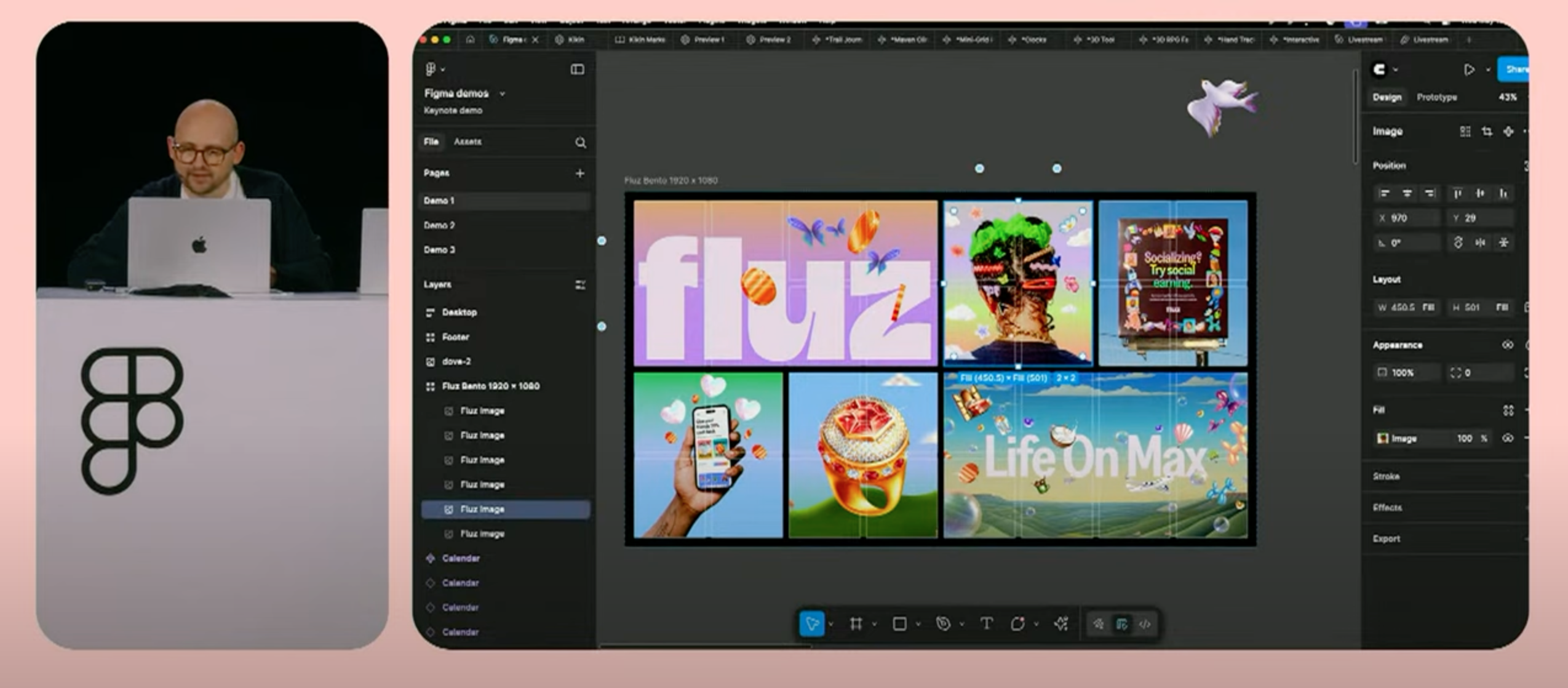
Figma Grid is an expansion of Figma’s Auto Layout tools and workflow. It has a lot of promise for future layouts, and will help our team communicate grid functionality during the design/dev handoff process.

CI
Dev Insights
The Positive
Allows a more streamline process
The community had several UI issue with grid, you can’t set set measurements in the side bars for content spans, you have to drag and drop the sizes. Another issue was dimensions couldn’t be specified at once and each need to be set individually. Variable issues with things like track sizing and row + column count were also brought up as users whished for features like these to be available on launch
Grid allows clear instructions
for developers
Grid allows designers to define in the design when to use grid elements as opposed to flex.
The Negative
Community had several issues with grid functionality
The community had several UI issue with grid, you can’t set set measurements in the side bars for content spans, you have to drag and drop the sizes. Another issue was dimensions couldn’t be specified at once and each need to be set individually. Variable issues with things like track sizing and row + column count were also brought up as users whished for features like these to be available on launch
I Legit Cannot think of any
I, at the time, couldn’t think of any issues with Grid, but the community had more than a few words.
CJ
Design Insights
This feature has a ton of potential, but it’s not quite where it needs to be for our us to use it reliably JUST yet.
The Positive
Design/Dev Handoff
Will help with Design/Dev hand-off when communicating breakpoint behavior, screen-size specific displays, and responsiveness at a component level
Prototypes & Layouts
Grid will help tremendously with responsive layouts and prototyping in the very near future.
The Negative
It is missing the flexibility and universality that it needs to be used reliably right now
There are too many inconsistencies with the way that this feature works right now to implement it. Realistically, it may take a few updates for this feature to accurately display in a way that is reflective of real site grid behavior.
Will take some time to implement into our layout workflows and process
May require a little bit of time to get used to working this into our standard workflow, and troubleshooting for best practices - but still a worthwhile effort

© Carter Igo, 2025
All Rights Reserved
FIgma Grid
Figma Grid is an expansion of Figma’s Auto Layout tools and workflow. It has a lot of promise for future layouts, and will help our team communicate grid functionality during the design/dev handoff process.
CI
Dev Insights
The Positive
Allows a more streamline process
The community had several UI issue with grid, you can’t set set measurements in the side bars for content spans, you have to drag and drop the sizes. Another issue was dimensions couldn’t be specified at once and each need to be set individually. Variable issues with things like track sizing and row + column count were also brought up as users whished for features like these to be available on launch
Grid allows clear instructions
for developers
Grid allows designers to define in the design when to use grid elements as opposed to flex.
The Negative
Community had several issues with grid functionality
The community had several UI issue with grid, you can’t set set measurements in the side bars for content spans, you have to drag and drop the sizes. Another issue was dimensions couldn’t be specified at once and each need to be set individually. Variable issues with things like track sizing and row + column count were also brought up as users whished for features like these to be available on launch
I Legit Cannot think of any
I, at the time, couldn’t think of any issues with Grid, but the community had more than a few words.
CJ
Design Insights
This feature has a ton of potential, but it’s not quite where it needs to be for our us to use it reliably JUST yet.
The Positive
Design/Dev Handoff
Will help with Design/Dev hand-off when communicating breakpoint behavior, screen-size specific displays, and responsiveness at a component level
Prototypes & Layouts
Grid will help tremendously with responsive layouts and prototyping in the very near future.
The Negative
It is missing the flexibility and universality that it needs to be used reliably right now
There are too many inconsistencies with the way that this feature works right now to implement it. Realistically, it may take a few updates for this feature to accurately display in a way that is reflective of real site grid behavior.
Will take some time to implement into our layout workflows and process
May require a little bit of time to get used to working this into our standard workflow, and troubleshooting for best practices - but still a worthwhile effort

© Carter Igo, 2025
All Rights Reserved
Figma Grid
01
Figma Sites
02
Figma Make
03
Figma Buzz
04
Figma Draw
05
Playground
06
FIgma Grid
Figma Grid is an expansion of Figma’s Auto Layout tools and workflow. It has a lot of promise for future layouts, and will help our team communicate grid functionality during the design/dev handoff process.

CI
Dev Insights
The Positive
Grid allows clear instructions
for developers
Grid allows designers to define in the design when to use grid elements as opposed to flex.
Allows a more streamline process
Grid allows for an easier layout process when building web pages. The Figma grid team showing it off made it seem seamless to implement in design files and Figma Sites
The Negative
I Legit Cannot think of any
I, at the time, couldn’t think of any issues with Grid, but the community had more than a few words.
Community had several issues with grid functionality
The community had several UI issues with Grid, you can’t set measurements in the side bars for content spans, you have to drag and drop the sizes. Another issue was that dimensions couldn’t be specified at once, and each needed to be set individually. Variable issues with track sizing and row + column count were also brought up as users wished for features like these to be available on launch.
CJ
Design Insights
This feature has a ton of potential, but it’s not quite where it needs to be for our us to use it reliably JUST yet.
The Positive
Prototypes & Layouts
Grid will help tremendously with responsive layouts and prototyping in the very near future.
Design/Dev Handoff
Will help with Design/Dev hand-off when communicating breakpoint behavior, screen-size specific displays, and responsiveness at a component level
The Negative
Will take some time to implement into our layout workflows and process
May require a little bit of time to get used to working this into our standard workflow, and troubleshooting for best practices - but still a worthwhile effort
It is missing the flexibility and universality that it needs to be used reliably right now
There are too many inconsistencies with the way that this feature works right now to implement it. Realistically, it may take a few updates for this feature to accurately display in a way that is reflective of real site grid behavior.

© Carter Igo, 2025
All Rights Reserved

