FIgma Sites
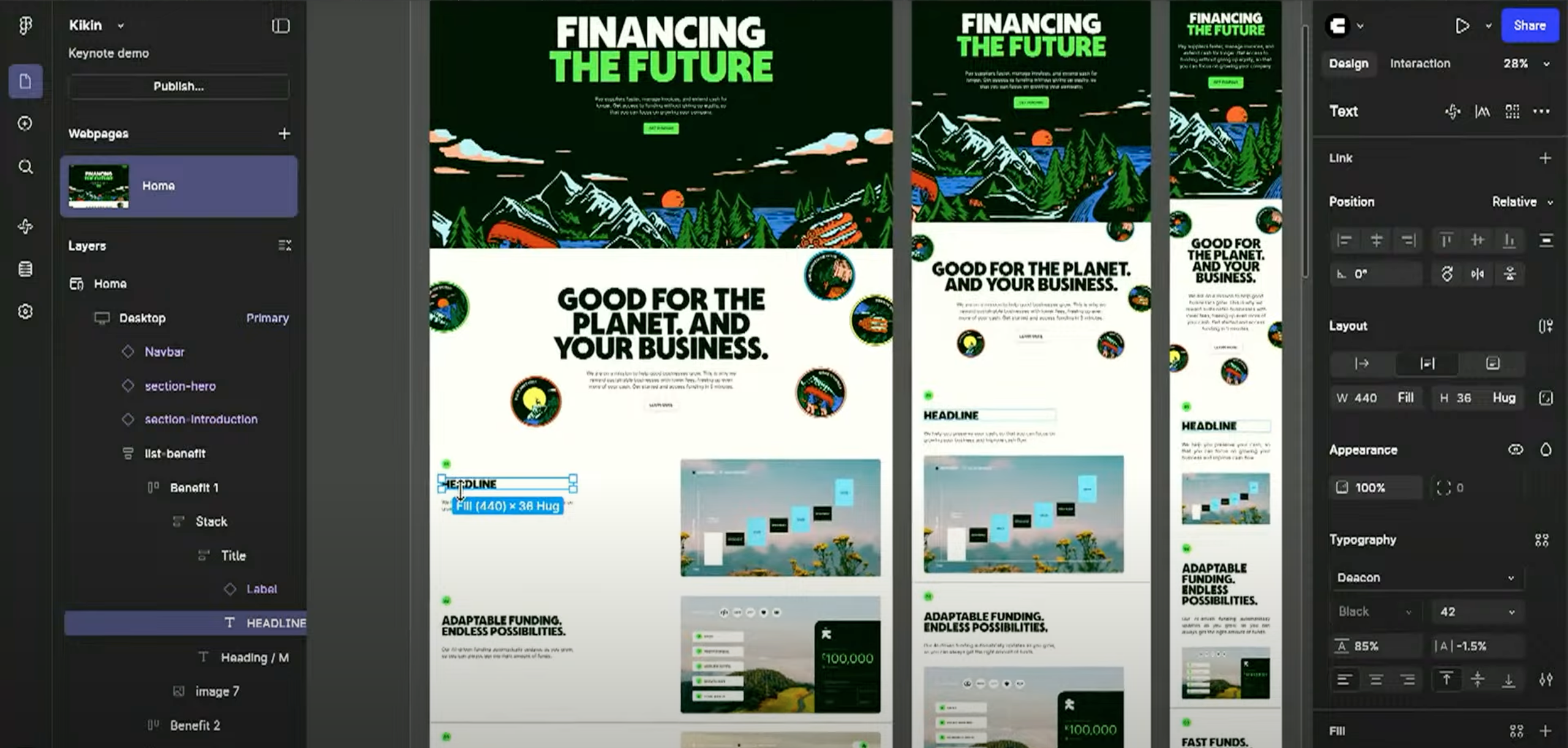
Figma Sites was launched on May 7, 2025 and is in beta testing with the Figma Community. It includes its own CMS, hosting, etc.

CI
Dev Insights
Sites has the potential to be great if the team at Figma is able to piviot off of community feedback and remake some features
The Positive
Figma SItes team is very responsive in the discord
Sho Kuwamoto, the VP of product for Figma Sites, has been active in the Discord for the Figma Sites beta. They, alongside their team, have addressed multiple concerns and interacted directly with the community.
Custom breakpoint allow for simple development
You can edit page content across all breakpoints at once and then make changes if needed to individual sizes.
Sites has a ton of built in custom effects
Sites has several built in css effects that can save time for devs trying ot make a really fancy website. Some of these features are just things like custom hover effect, and can range to scroll parralax and
Sites are easy to create and launch
As seen in the demo for sites along side us making this one, sites are very easy to make and launch.
“I’ve asked the Figma Sites team to prioritize accessibility updates and get them out more quickly so we can get back on track.”

Sho Kuwamoto
VP of Product for Figma Sites
The Negative
Comunity memebrs are
Dev community members seem to be masssivly upset in the community
Its lacking basic features
Sites lack basic features like 404 pages, custom fonts, and custom HTML. They are also missing functionality for things like forms and naked domain connections.
Sites need more accessibility support
Community members say screen readers break constantly, and im my own testing tab indicies seems to be buggy
The generated code is a complete mess
Div tags are assigned to ALL elements except images unless you change the tag on each element manually. This is bad for SEO and Accessibility due to how div tags should be used and how a page's HTML architecture is defined.

CJ
Design Insights
Figma Sites could have some incredible potential. Assuming that Figma acts on their promises during Config, there is a lot that we could do with this tool in the future. However, I think the beta limitations and red flags indicate that we should wait until this product is in a more stable place before we consider working it into our standard workflow in any capacity.
The Positive
Great for visualizing responsiveness and breakpoints
Figma sites has significantly more options in regards to designing for different screen sizes. You can set unique font sizes, image crops, vertical spacing, etc and immediately see how the elements adjust based on the display size.
Has potential as a great prototyping & presentation tool for partners
From what I can tell, Figma Sites already out-performs our standard prototypes. I’ve had significantly less issues while testing this site than I have encountered
If the product becomes more stable, it could be great for campaign landing pages and microsites.
As long as auto-layout is present and structured well, you can drag and drop in any figma layout and get immediate responsive behaviors for your different breakpoints.
Layout is VERY fast and intuitive, and lines up well with our existing workflow
As long as auto-layout is present and structured well, you can drag and drop in any figma layout and get immediate responsive behaviors for your different breakpoints. If we wish to pursue Figma Sites in any capacity, even if the final product is used for internal communication and partner review, we’re set up to hit the ground running
“The Figma Sites team is pretty capable (and broken into several squads). We anticipated needing to respond to launch feedback, so we assumed the next couple cycles would do just that.”
Adam Lehman
Product Lead for Figma Sites, Public Beta Discord
The Negative
Figma Sites is missing some key design features, which could present issues with branded assets.
Currently, customization within Figma sites is limited, or the platform really makes you work for it. It is missing custom fonts amongst other things. I’ve also noticed a number of issues in which images disappear or lose formatting.
Auto-layout within Figma Sites is not quite where it needs to be - and the design community is quite upset about it.
While building this test site, auto-layout broke on a number of occasions. The platform is quite sensitive in regards to block placement and behavior, and the individual blocks can get finnicky
Figma Sites is currently lacking the ability to set the tag at the main component level.
As Carter mentioned, the code output from Figma sites is quite poor in the beta. The current process requires the designer/developer to set the tag for each individual component on a page manually, which is too time consuming and limiting.

© Carter Igo, 2025
All Rights Reserved

Menu
Brand Story
01
Verbal
02
Logo
03
Color
04
Figma Draw
05
Experiments
06

Other Fun Stuff
All Config Sessions
Figma Sites Discord
FIgma Sites
Figma Sites was launched on May 7, 2025 and is in beta testing with the Figma Community. It includes its own CMS, hosting, etc.
CI
Dev Insights
Sites has the potential to be great if the team at Figma is able to piviot off of community feedback and remake some features
The Positive
Figma SItes team is very responsive in the discord
Sho Kuwamoto, the VP of product for Figma Sites, has been active in the Discord for the Figma Sites beta. They, alongside their team, have addressed multiple concerns and interacted directly with the community.
Custom breakpoint allow for simple development
You can edit page content across all breakpoints at once and then make changes if needed to individual sizes.
Sites has a ton of built in custom effects
Sites has several built in css effects that can save time for devs trying ot make a really fancy website. Some of these features are just things like custom hover effect, and can range to scroll parralax and
Sites are easy to create and launch
As seen in the demo for sites along side us making this one, sites are very easy to make and launch.
“I’ve asked the Figma Sites team to prioritize accessibility updates and get them out more quickly so we can get back on track.”
Sho Kuwamoto
VP of Product for Figma Sites
The Negative
Comunity memebrs are
Dev community members seem to be masssivly upset in the community
Its lacking basic features
Sites lack basic features like 404 pages, custom fonts, and custom HTML. They are also missing functionality for things like forms and naked domain connections.
Sites need more accessibility support
Community members say screen readers break constantly, and im my own testing tab indicies seems to be buggy
The generated code is a complete mess
Div tags are assigned to ALL elements except images unless you change the tag on each element manually. This is bad for SEO and Accessibility due to how div tags should be used and how a page's HTML architecture is defined.
CJ
Design Insights
Figma Sites could have some incredible potential. Assuming that Figma acts on their promises during Config, there is a lot that we could do with this tool in the future. However, I think the beta limitations and red flags indicate that we should wait until this product is in a more stable place before we consider working it into our standard workflow in any capacity.
The Positive
Great for visualizing responsiveness and breakpoints
Figma sites has significantly more options in regards to designing for different screen sizes. You can set unique font sizes, image crops, vertical spacing, etc and immediately see how the elements adjust based on the display size.
Has potential as a great prototyping & presentation tool for partners
From what I can tell, Figma Sites already out-performs our standard prototypes. I’ve had significantly less issues while testing this site than I have encountered
If the product becomes more stable, it could be great for campaign landing pages and microsites.
As long as auto-layout is present and structured well, you can drag and drop in any figma layout and get immediate responsive behaviors for your different breakpoints.
Layout is VERY fast and intuitive, and lines up well with our existing workflow
As long as auto-layout is present and structured well, you can drag and drop in any figma layout and get immediate responsive behaviors for your different breakpoints. If we wish to pursue Figma Sites in any capacity, even if the final product is used for internal communication and partner review, we’re set up to hit the ground running
“The Figma Sites team is pretty capable (and broken into several squads). We anticipated needing to respond to launch feedback, so we assumed the next couple cycles would do just that.”
Adam Lehman
Product Lead for Figma Sites, Public Beta Discord
The Negative
Figma Sites is missing some key design features, which could present issues with branded assets.
Currently, customization within Figma sites is limited, or the platform really makes you work for it. It is missing custom fonts amongst other things. I’ve also noticed a number of issues in which images disappear or lose formatting.
Auto-layout within Figma Sites is not quite where it needs to be - and the design community is quite upset about it.
While building this test site, auto-layout broke on a number of occasions. The platform is quite sensitive in regards to block placement and behavior, and the individual blocks can get finnicky
Figma Sites is currently lacking the ability to set the tag at the main component level.
As Carter mentioned, the code output from Figma sites is quite poor in the beta. The current process requires the designer/developer to set the tag for each individual component on a page manually, which is too time consuming and limiting.

© Carter Igo, 2025
All Rights Reserved
Brand Story
01
Verbal
02
Logo
03
Color
04
Figma Draw
05
Experiments
06
Other Fun Stuff
All Config Sessions
Figma Sites Discord
Figma Grid
01
Figma Sites
02
Figma Make
03
Figma Buzz
04
Figma Draw
05
Playground
06
FIgma Sites
Figma Sites was launched on May 7, 2025 and is in beta testing with the Figma Community. It includes its own CMS, hosting, etc.
CI
Dev Insights
Sites has the potential to be an amazing product if the team at Figma is able to pivot off of community feedback and remake some features.
The Positive
Sites are easy to create and launch
As seen in the demo for sites along side us making this one, sites are very easy to make and launch.
Sites has a ton of built in custom effects
Sites has several built-in CSS effects that can save time for devs/designers trying to make a fancy website. Some of these features are just things like custom hover effect, and can range from scroll parallax and custom textures.
Custom breakpoint allow for simple development
You can edit page content across all breakpoints at once and then make changes if needed to individual sizes.
Figma Sites team is very responsive in the discord
Sho Kuwamoto, the VP of product for Figma Sites, has been active in the Discord for the Figma Sites beta. They, alongside their team, have addressed multiple concerns and interacted directly with the community.
“I’ve asked the Figma Sites team to prioritize accessibility updates and get them out more quickly so we can get back on track.”
Sho Kuwamoto
VP of Product for Figma Sites
The Negative
The generated code is a complete mess
Div tags are assigned to ALL elements except images unless you change the tag on each element manually. This is bad for SEO and Accessibility due to how div tags should be used and how a page's HTML architecture is defined.
Sites need more accessibility support
Community members say screen readers break constantly, and tab indices are buggy with no support to add more. When testing it Caitlynn said: It’s not formatted correctly but it “works” ”.
Its lacking basic features
Sites lack basic features like 404 pages, custom fonts, and custom HTML. They are also missing functionality for things like forms and naked domain connections.
Subpages don’t exist
It seems like you can only go one layer deep on sites, because child pages don’t exist at the moment.
CJ
Design Insights
Figma Sites could have some incredible potential. Assuming that Figma acts on their promises during Config, there is a lot that we could do with this tool in the future. However, I think the beta limitations and red flags indicate that we should wait until this product is in a more stable place before we consider working it into our standard workflow in any capacity.
The Positive
Layout is VERY fast and intuitive, and lines up well with our existing workflow
As long as auto-layout is present and structured well, you can drag and drop in any figma layout and get immediate responsive behaviors for your different breakpoints. If we wish to pursue Figma Sites in any capacity, even if the final product is used for internal communication and partner review, we’re set up to hit the ground running
If the product becomes more stable, it could be great for campaign landing pages and microsites.
As long as auto-layout is present and structured well, you can drag and drop in any figma layout and get immediate responsive behaviors for your different breakpoints.
Has potential as a great prototyping & presentation tool for partners
From what I can tell, Figma Sites already out-performs our standard prototypes. I’ve had significantly less issues while testing this site than I have encountered
Great for visualizing responsiveness and breakpoints
Figma sites has significantly more options in regards to designing for different screen sizes. You can set unique font sizes, image crops, vertical spacing, etc and immediately see how the elements adjust based on the display size.
“The Figma Sites team is pretty capable (and broken into several squads). We anticipated needing to respond to launch feedback, so we assumed the next couple cycles would do just that.”
Adam Lehman
Product Lead for Figma Sites, Public Beta Discord
The Negative
Figma Sites is currently lacking the ability to set the tag at the main component level.
As Carter mentioned, the code output from Figma sites is quite poor in the beta. The current process requires the designer/developer to set the tag for each individual component on a page manually, which is too time consuming and limiting.
Auto-layout within Figma Sites is not quite where it needs to be - and the design community is quite upset about it.
While building this test site, auto-layout broke on a number of occasions. The platform is quite sensitive in regards to block placement and behavior, and the individual blocks can get finicky when placed inside of the layout frame.
Figma Sites is missing some key design features, which could present issues with branded assets.
Currently, customization within Figma sites is limited, or the platform really makes you work for it. It is missing custom fonts amongst other things. I’ve also noticed a number of issues in which images disappear or lose formatting.

© Carter Igo, 2025
All Rights Reserved

